> ## Documentation Index
> Fetch the complete documentation index at: https://alltick.mintlify.site/llms.txt
> Use this file to discover all available pages before exploring further.
# Price Change, Market Closure, Holidays, Limit Up/Down, IPO and Delisting
> This page explains AllTick stock API fields for price change, market closure, holidays, limit up, limit down, IPO and delisting status so developers can parse trading calendars and market status correctly.
## Price Change Description
AllTick interfaces do not provide a price change or 24-hour price change field. Customers can calculate price changes themselves by obtaining AllTick data.
1. **Daily price change calculation methods**:
* **Method 1**: Use the HTTP interface to obtain today's daily K-line closing price and the previous day's daily K-line closing price. The formula is:
Price change = (today's closing price - previous day's closing price) / previous day's closing price \* 100%
* **Method 2**: Use the WebSocket interface to obtain the latest price, and use the HTTP interface to obtain the previous day's daily K-line closing price. The formula is:
Price change = (latest price - previous day's closing price) / previous day's closing price \* 100%
2. **24-hour price change calculation method**:
* Use the WebSocket latest trade price interface (request protocol number: 22004) to receive tick-by-tick trade prices in real time.
* You need to store the latest price from 24 hours ago that was pushed by the WebSocket interface for subsequent calculation.
* Formula:
24-hour price change = (latest price - latest price 24 hours ago) / latest price 24 hours ago \* 100%
## Market Closure or Trading Hours Description
AllTick does not provide an interface for market closures or trading hours. Customers can view the fixed trading hours of each product type in the [Product List](https://docs.google.com/spreadsheets/d/1avkeR1heZSj6gXIkDeBt8X3nv4EzJetw4yFuKjSDYtA/edit?gid=495387863#gid=495387863).
[Product List](https://docs.google.com/spreadsheets/d/1avkeR1heZSj6gXIkDeBt8X3nv4EzJetw4yFuKjSDYtA/edit?gid=495387863#gid=495387863)
## Holiday Description
AllTick does not provide a holiday interface. Holiday closure notices will be published in advance in our Telegram channels. Please refer to the Telegram channel notices for specific products that are closed during holidays, and follow the channels for the latest holiday closure notifications.
Chinese channel: [Telegram Channel](https://t.me/alltick_cn)
English channel: [Telegram Channel](https://t.me/alltick_en)
## Stock Limit Up/Down Description
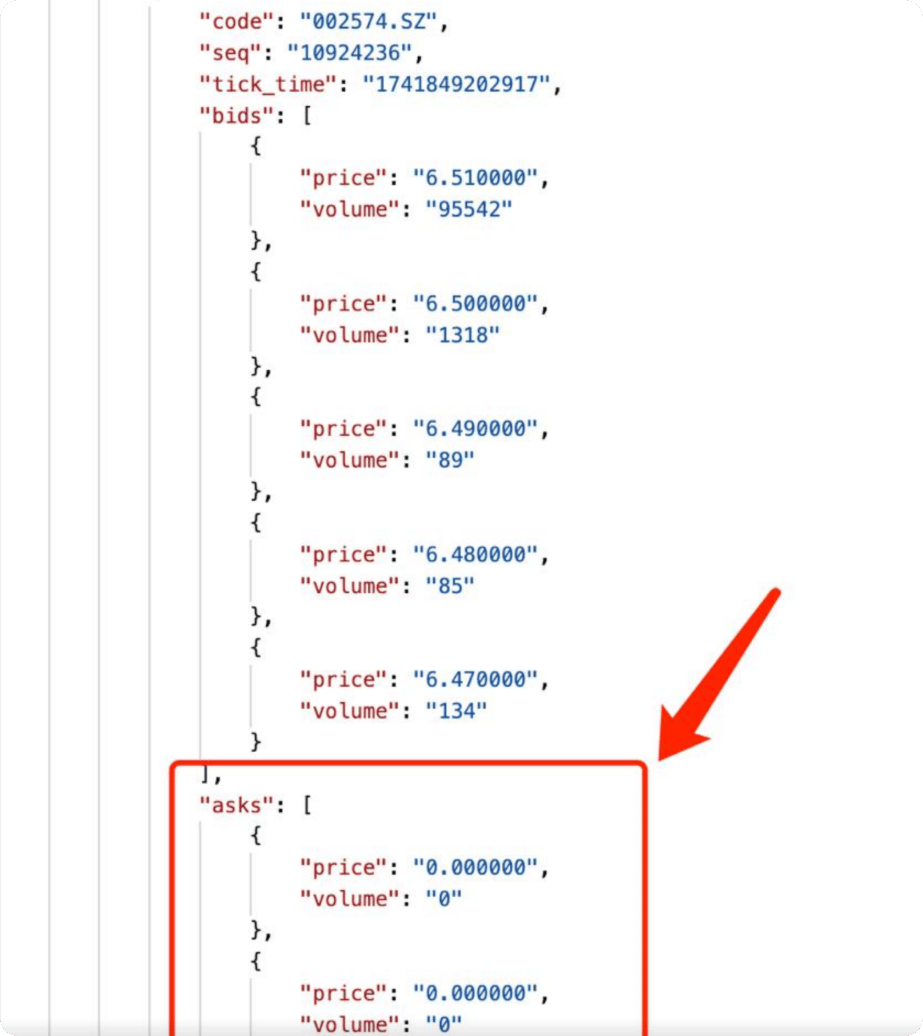
AllTick does not provide an interface for judging limit up or limit down. Customers can judge whether a stock is limit up or limit down in the following way:
1. **Judgment based on order book interface data**: When subscribing to the order book interface, if only one side has data while the prices and volumes on the other side all return 0, it can be judged as limit up or limit down. The specific judgment method is as follows:
* If only the `bid` side has data and all `ask` prices and volumes return 0, the stock is limit up.
* If only the `ask` side has data and all `bid` prices and volumes return 0, the stock is limit down.
Below is a sample screenshot of the returned data:
 ## Stock Delisting Judgment Description
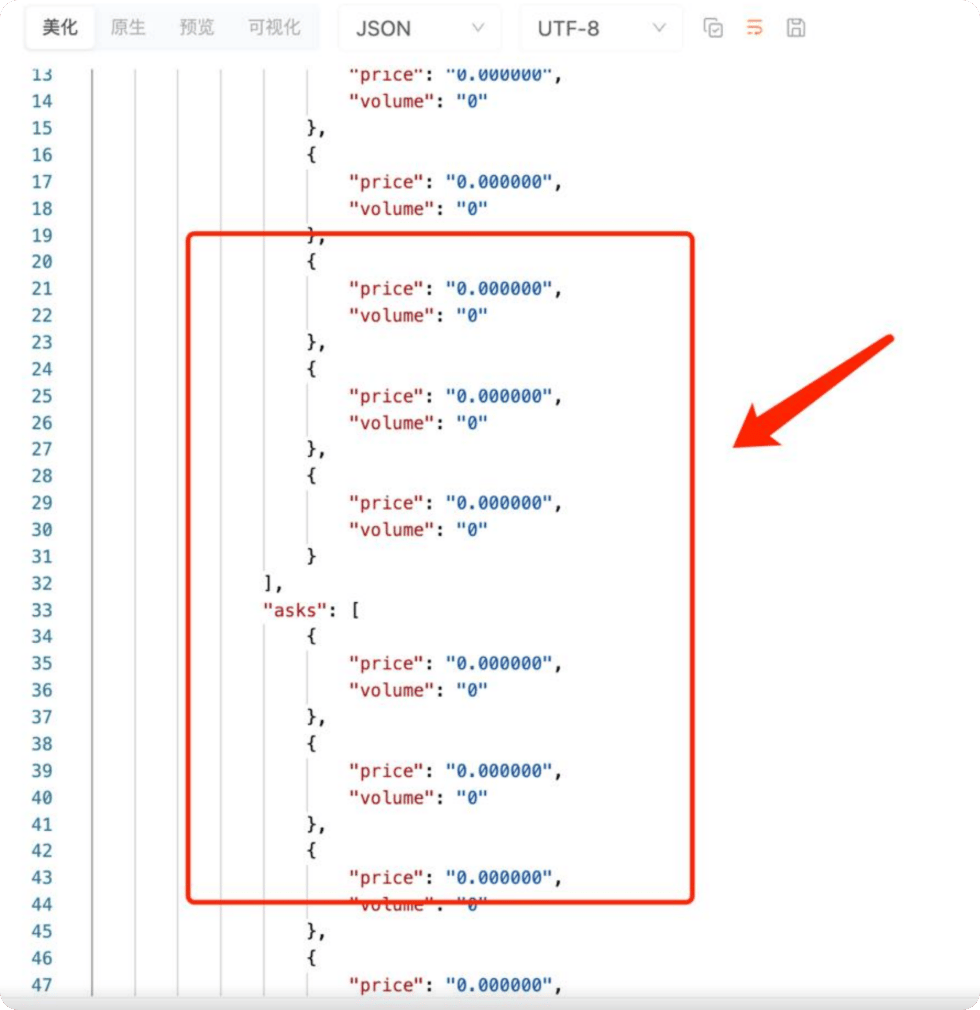
AllTick does not provide a delisting judgment interface. Customers can judge whether a stock has been delisted in the following way:
**Judgment method**: When subscribing to the order book interface, if the prices and volumes on both the `bid` and `ask` sides all return 0, it means the stock has been delisted.
Below is a sample screenshot of the returned data:
## Stock Delisting Judgment Description
AllTick does not provide a delisting judgment interface. Customers can judge whether a stock has been delisted in the following way:
**Judgment method**: When subscribing to the order book interface, if the prices and volumes on both the `bid` and `ask` sides all return 0, it means the stock has been delisted.
Below is a sample screenshot of the returned data:
 ## IPO Description
AllTick does not provide an interface for judging IPOs. We regularly update the [Product List](https://docs.google.com/spreadsheets/d/1avkeR1heZSj6gXIkDeBt8X3nv4EzJetw4yFuKjSDYtA/edit?gid=495387863#gid=495387863) to reflect newly listed stocks and remove delisted stocks from the list.
Click the link below for the product list:
[Product List](https://docs.google.com/spreadsheets/d/1avkeR1heZSj6gXIkDeBt8X3nv4EzJetw4yFuKjSDYtA/edit?gid=495387863#gid=495387863)
#### AllTick Website
Official website: [https://alltick.co/](https://alltick.co/)
## IPO Description
AllTick does not provide an interface for judging IPOs. We regularly update the [Product List](https://docs.google.com/spreadsheets/d/1avkeR1heZSj6gXIkDeBt8X3nv4EzJetw4yFuKjSDYtA/edit?gid=495387863#gid=495387863) to reflect newly listed stocks and remove delisted stocks from the list.
Click the link below for the product list:
[Product List](https://docs.google.com/spreadsheets/d/1avkeR1heZSj6gXIkDeBt8X3nv4EzJetw4yFuKjSDYtA/edit?gid=495387863#gid=495387863)
#### AllTick Website
Official website: [https://alltick.co/](https://alltick.co/)